Getting Started with Barvinca for Autodesk Administration
Everything you need to start using Barvinca in under 5 minutes.
What is Barvinca?
Barvinca is a hosted web platform for Autodesk Forma and BIM 360 administration. The current Marketplace launch is focused on Bulk User Manager.
New users receive 50 one-time welcome CREDS for Bulk User Manager, dry-run previews, operation history, and capped write execution. Future tools are not exposed in the launch subscription.
Write execution is counted in CREDS: 1 Autodesk write mutation = 1 CREDS. Reads, sync, setup checks, discovery, and dry-runs cost 0 CREDS.
Step-by-Step Setup
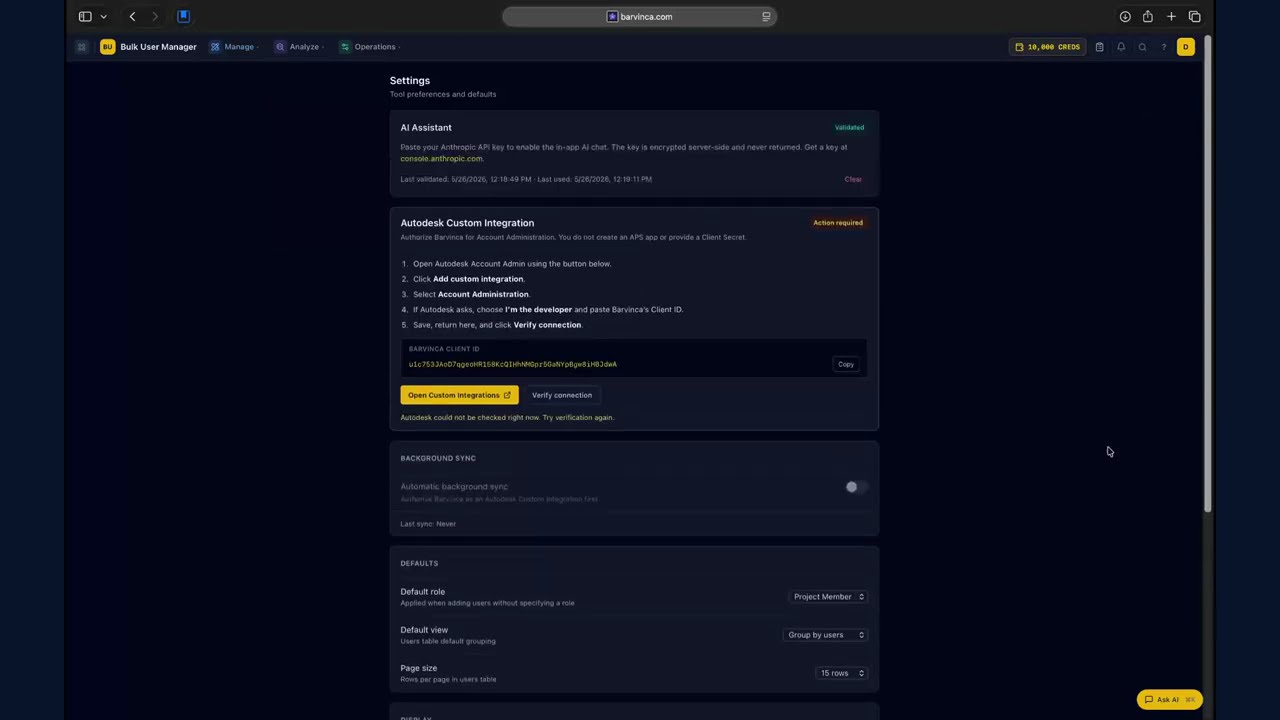
Open the setup video on YouTube.
- 1Sign in — Click "Sign in with Autodesk" on the landing page. This uses 3-legged OAuth to authenticate with your Autodesk account.
- 2Add Barvinca integration — Follow the Setup Guide. A Hub Admin copies the Barvinca APS Client ID from Profile and adds it as a Custom Integration in Autodesk Forma Hub Administration or BIM 360 Account Admin with Account Administration permission.
- 3Open Bulk User Manager — Go to the Dashboard, verify the first-run setup state is clear, and open the available tool.
Authentication Types
3-legged (User) — Autodesk OAuth uses authorization code with PKCE to sign you in. The user session token is encrypted and retained server-side.
2-legged (Barvinca App) — For hub-level administration, Barvinca's managed APS application uses separate server-side client-credentials authorization after a Hub Admin authorizes the Client ID. End users do not create an APS app or provide a Client Secret.
Launch Access
- Welcome balance — 50 CREDS for Bulk User Manager write execution, issued once on sign-in with no automatic refresh.
- Paid plans — Monthly CREDS plans are handled through support while automated checkout is not live.
Need Help?
Use the Setup Guide, browse the documentation for Bulk User Manager, or contact support@barvinca.com.